System settings
The system settings contain all relevant parameters for communication with the devices.
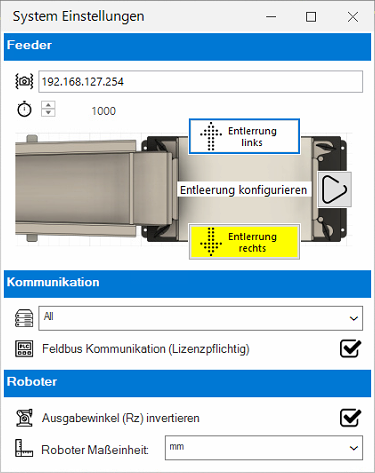
| Feeder | ||

|
IP Address of Asycubes | IP address of the connected Asycube. |

|
Connection timeout | Connection timeout for communication between the software and Asycube in milliseconds (ms). This timeout is used for each command. |

|
Activate Asycube simulation | Bridges the control of the Asycube for commissioning purposes. The control of the Asycube is completely deactivated. |
| Configure emptying | Activates/deactivates the purge. The alignment of the purge is important for the correct transport of the components! | |
| Communication | ||

|
IP address of the TCP/IP communication | IP address for the connection from PLC or robot to EasySightPro®. With the All option, the connection can be established via all available network ports. |

|
Fieldbus communication | Enables communication via fieldbus module (licence required) |
| Roboter | ||

|
Invert output angle (Rz) | The angle of rotation Rz can be inverted depending on how the robot is mounted and the orientation of the coordinate system. |

|
Robot unit of measurement | Output format of the detected positions in millimetres or metres. |