Backup
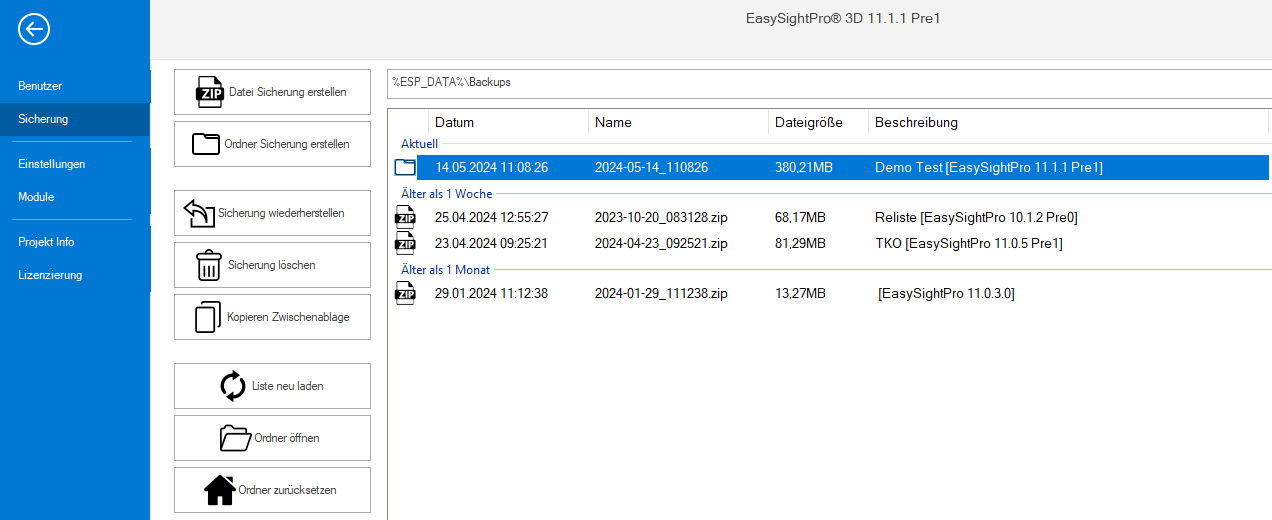
All program data can be saved or restored via the main.
Information: A backup contains all relevant data such as program settings, test sequence. To ensure that external data (e.g. DeepLearning Runtime, saved calibrations) are automatically saved, they must be stored in %PROGRAMDATA%\EasySightPro\Binaries..
Two types of backups are available:

|
Two types of backups are available:. Advantage: Compression of the data to approx. 30% Disadvantage: Time-consuming due to compression and therefore slower |

|
During a folder backup, all relevant data is copied to a folder. Advantage: Maximum speed Disadvantage: Data is copied 1:1 and not compressed, therefore greater memory consumption |
 Menu
Menu
|
|
Creates a new backup. Changes can be documented in the comment field. These are displayed in the overview list in the "Description" column. |
|
|
Creates a new backup. Changes can be documented in the comment field. These are displayed in the overview list in the "Description" column. |

|
Deletes the selected backup. |

|
Copies the selected backup to the Windows clipboard. This can then be copied to a desired location with CTRL+V. |

|
Refreshes the overview and reloads the list of local backups. |

|
Opens the folder with the backups in Windows Explorer. |

|
Resets the local backups folder to factory defaults. |
Overview backups
The overview shows the currently available backups including date, name, size and stored description.
The folder with the local backups can be changed and customized if necessary.
Warning: When the folder is changed, the backups are not copied and remain in the old folder!
What includes a backup
A backup is an unencrypted ZIP archive that can be opened and unpacked with any compatible ZIP program even without EasySightPro®.
The following data is backed up:
| Path | Description |
|---|---|
| %PROGRAMDATA%\EasySightPro\Database.sdf | Database file with EasySightPro® configuration |
| %PROGRAMDATA%\EasySightPro\DockingState.xml | Saved window layout |
| %PROGRAMDATA%\EasySightPro\Language.xml | Saved language settings |
| %PROGRAMDATA%\EasySightPro\EasyReportingViewer.json | EasyReportingViewer settings |
| %PROGRAMDATA%\EasySightPro\EasyJobViewer.json | EasyJobViewer settings |
| %PROGRAMDATA%\EasySightPro\Binaries\ | Folder with necessary binary data (programmes). The complete test sequence (without camera and programme settings) is saved in the binary files. |
| %PROGRAMDATA%\EasySightPro\Scripts\ | Folder with scripts of the Scripting Module |
| %APPDATA%\Cognex Corporation\VisionPro-A5000\ | Folder with Cognex A5000 configuration data |
| %ESP_ROOT%\Version.txt | Release notes from EasySightPro® |