Save 3D image
This block is used to save 3D images.
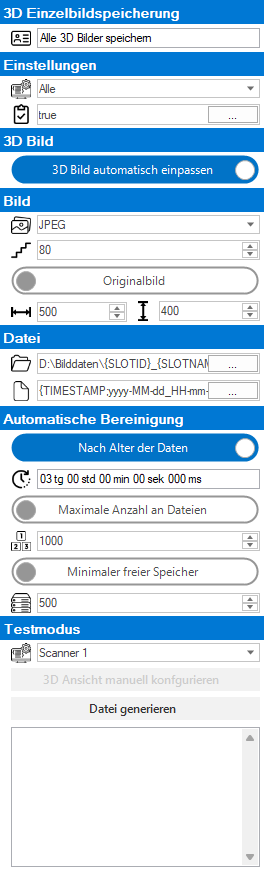
 3D image recording

|
Name of the block for display in the overview. |
Settings

|
Selection of the test station for which this module is to save data. If the option "All" is selected, the data will be generated for all stations. |

|
If this save condition is met, then the data set is saved. The configuration is done via the integrated condition editor. |
Image 3D
| Fit 3D view | Automatic: The 3D view is set automatically for rendering Manual: The 3D view can be set in test mode using the "Configure 3D view manually" button |
Image

|
File Type: |

|
Compression of the image for JPEG and OVERLAY |
| Original image: The image is saved in the available resolution Reduce image: the image is reduced to the configured resolution |
|

|
New image width for "Reduce image". |

|
New image height for "Reduce image". |
File

|
Configuration of the base folder. The configuration is done via the integrated configurator. |

|
Configuration of the file name. The configuration is done via the integrated configurator. |
Automatic cleanup
| By age of data | Deletes all files from the set age. |
| Maximum number of files | Deletes all data if there is more than the set number in the folder. |
| Minimum free memory | Deletes all files by age when the disk space falls below the set value. |
Please note the further information on cleanup!
Test mode
The test mode is used to test the storage condition or the paths and file names. IMPORTANT: There must be a test result with valid data for the test to be performed.