EasyTools
The EasyTool template uses a CogToolBlock as a basis for the flexible programming of tools. The EasyTool standard makes it possible to add new tools to the EasySightPro® table.
Existing Cognex tools can be easily and quickly integrated EasySightPro®ES.
Toolbox
After installation, the tool appears in the EasyTools toolbox.

User interface
EasyTools is a tool concept to easily and flexibly integrate Cognex tools into the EasySightPro® result table. Through the generic programming, the program code and the user operation are to be separated from each other.
Integration of the template as a separate tool in the table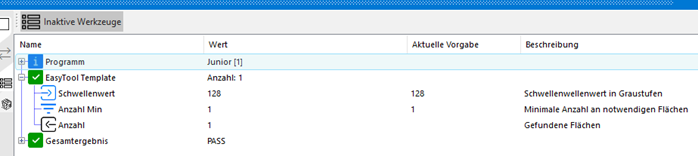
Changing search region (CurrentRunRecord)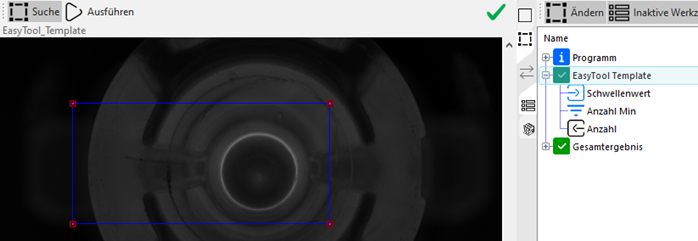
Direct modification of limit values and parameters
EasyTool - Inputs and outputs
For the template to be displayed in the table, at least one input or output must start with the corresponding prefix.
Inputs and outputs are used to interact with the user.
Inputs:
-
PARAM_ for parameter
-
PARAMA_ for advanced parameter
-
THRESHOLD_ for thresholds
-
THRESHOLDA_ for advanced thresholds
Outputs:
-
RESULT_ for results
-
RESULTA_ for advanced results
For all advanced functions a special user right is necessary.
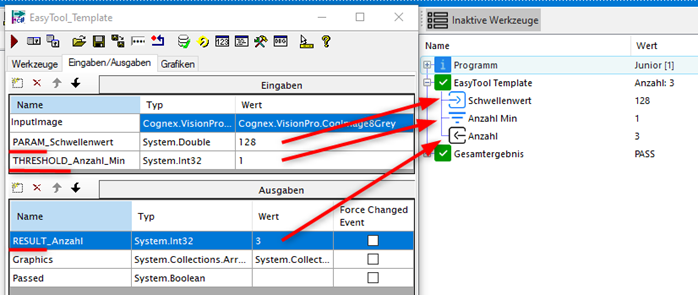
The "Graphics" output must not be deleted, as it is used to collect graphics data for the display.