Segment width
This EasyTool is used to measure the width of a continuous segment. A light segment starts with a contrast transition (edge polarity) from dark to light and ends with a contrast transition from light to dark. The opposite is true for a dark segment.
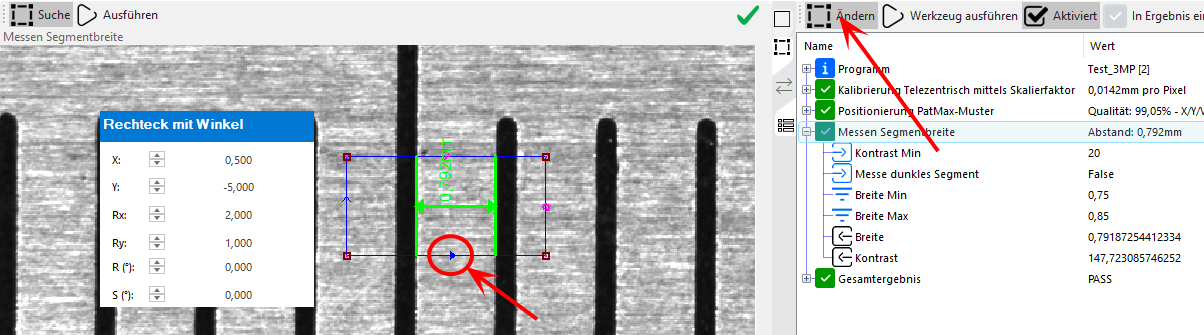
The search area is defined as a rectangle with an angle, whereby attention must be paid to the search direction. This determines the contrast transition and is marked by a filled arrow.
 Inputs
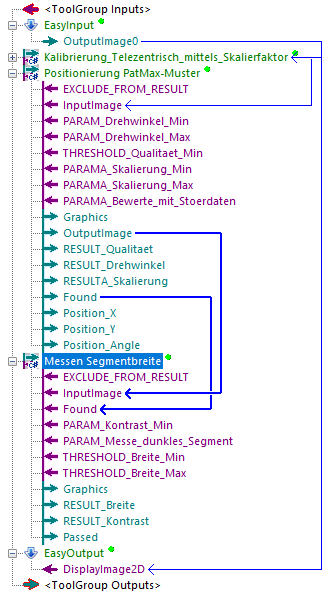
| InputImage | Input image in which the distance is measured |
| Found | Indicates whether a previously performed tracking was executed successfully. If this is not the case, the EasyTool is executed with an error. If the EasyTool is to be executed independently of a tracking, this input is not to be linked and must be set to True manually if necessary. |
Parameter
| Kontrast Min | Minimum contrast of the edges of the segment |
| Messe dunkles Segment | Indicates whether the segment to be measured is a dark (True) or light (False) segment. |
Thresholds
| Breite Min | Minimum tolerable width of the segment |
| Breite Max | Maximum tolerable width of the segment |
Information: The mean value of these two limit values forms the setpoint. This means that the segment whose width is closest to this setpoint is evaluated..
Results
| Breite | Measured width of the segment (unit depends on the input image) |
| Kontrast | Specifies the lowest contrast of the two edges |
Outputs
| Passed | Indicates whether the measurement was successful and the measured width is within the tolerance. |
