MultiImage Acquisition
It is possible to take several exposures with one trigger signal with one camera. Between the different exposures, the exposure time and/or illumination control can be changed..
Information: In this case, the acquisition control of the additional images is always taken over by EasySightPro®.
 Basic program via program administration
The settings for the basic image (first captured image) are stored in the program administration.
It is important that all necessary lighting outputs are configured in the basic image.
The supplied templates can be used as a starting point.
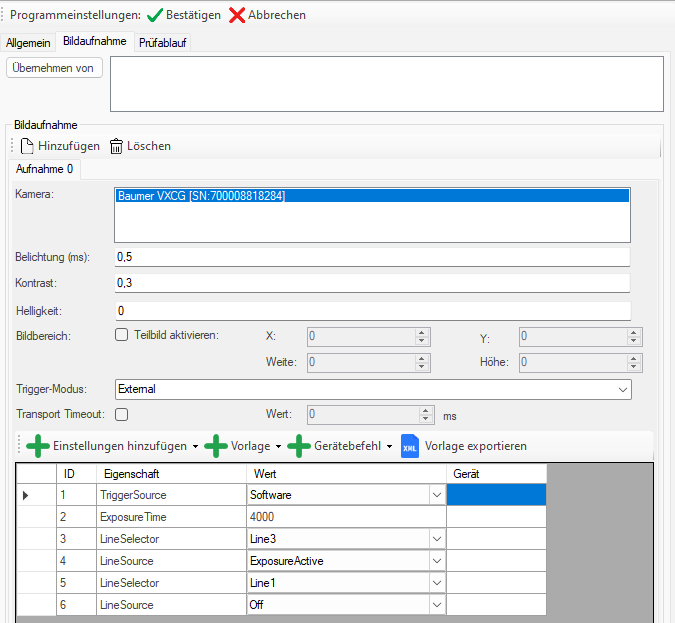
If the exposure time is to be changed from image to image, then the ExposureTime or ExposureTimeAbs feature must be inserted. The naming varies depending on the camera manufacturer.
The lighting outputs must be parameterized sequentially. For this purpose the output is selected by means of LineSelector and the function is assigned with LineSource.
In this example: Line 3 -> ExposureActive (light is controlled) and Line 1 -> Off (light is not controlled).
The exposure time as a feature is entered in nanoseconds and therefore differs from the standard exposure time (milliseconds).
Image acquisition sequence
After the basic program has been created and loaded, the additional images are parameterized.
This happens via the recording settings of the respective station:
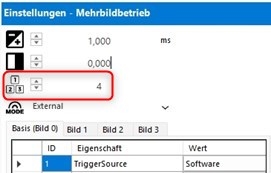
For each additional image a new tab is generated next to the base image.
In the new tabs, the exposure time and lighting outputs can be set separately.
The exposure time as a feature is entered in nanoseconds and therefore differs from the standard exposure time (milliseconds).
In den zusätzlichen Bildern können nicht benötigte Feature gelöscht werden. Dies ist Optional möglich und verkürzt die Zykluszeit etwas.
Inspection sequence
In the EasyInput Tool, the expected number of images for a valid check must be additionally stored, since a station can also perform multi-image acquisition with several cameras.
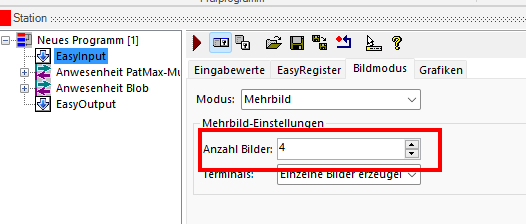
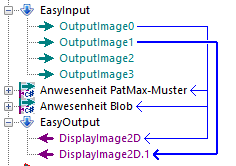
The EasyInput Tool automatically creates a new OutputImage for each image.
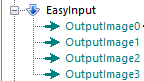
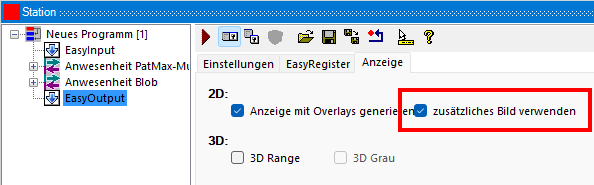
If required, up to 2 images can be configured for display in the EasyOutput tool:
Information:
If the station is switched to the live image, then the settings from the base image are automatically loaded. For the setup of the other images, the use of the Manual Trigger is recommended.