Scripting
With the scripting module EasySightPro® can be extended by additional functionality. All scripts are executed independently of the test tasks of the stations. Depending on the configuration, they are called cyclically in the background.
The Scripting module is not related to the scripts in the VisionPro tool blocks and is independent of them.
Information: Make sure that the scripting modul is loaded.
Information: All scripts are stored in readable form in the EasySightPro project folder (%PROGRAMDATA%\EasySightPro\Scripts).
The module window can be opened via the "Administration" menu.

The different scripts are listed in the overview window. The properties of the selected script are displayed in the lower area and can be edited there.
The Script Debug window contains status messages of the scripts for diagnostic purposes.
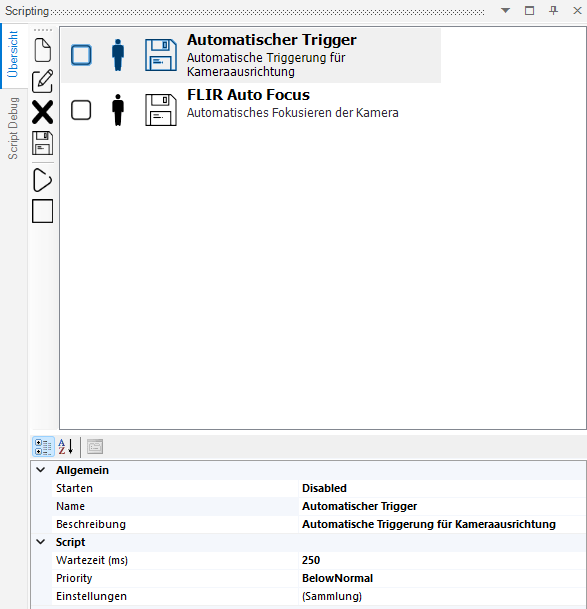

|
Creates a new script. |

|
Edits the selected script. |

|
Deletes the selected script. |

|
Saves the changes of the selected script. |

|
Starts the selected script. |

|
Stops the selected script. |

|
Script is not started automatically when EasySightPro® is started. |

|
Script is started automatically when EasySightPro® is started. |

|
Script is stopped and will not be executed. |

|
Script is executed. |
|
|
All changes have been saved. |

|
Script has been edited, but not yet saved. |
| Kategorie | Name | Beschreibung |
|---|---|---|
| Common | Start |
Disabled: The script is not executed automatically. RunOne: The script is executed once after starting EasySightPro®. RunContinous: The script is executed cyclically after the start of EasySightPro®. |
| Name | Name of the script. This is displayed in the overview. | |
| Description | Description of the script. This is displayed in the overview. | |
| Script | Pause time (ms) | Time between calls of the script in continuous mode. |
| Priority | Execution priority (.NET default). Default: BelowNormal | |
| Settings | List of script-specific properties. These are defined in the script |
Warning: The execution of the background scripts is NOT deterministic. The timing of execution is not guaranteed and may fluctuate accordingly.