Framos HPSC Controller
A dedicated interface is available for the FRAMOS HPSC flash controllers for simplified setup. This eliminates the need for 3rd party tools to parameterize the controllers.
Information: The control units module must be loaded in EasySightPro®.
Range of functions:
-
Automatic search of all accessible devices via Ethernet
-
Intuitive user interface for setup
-
Dockable window for each device
-
Changing the device parameters (name, IP settings)
-
Export and import of parameters
Menu
The controller module scans for new devices in the background every 5 seconds and provides a menu item for each device found (even if it is not accessible) under Administration → Controllers.
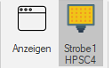
User interface
Click on the control unit in the menu to open the corresponding user interface.
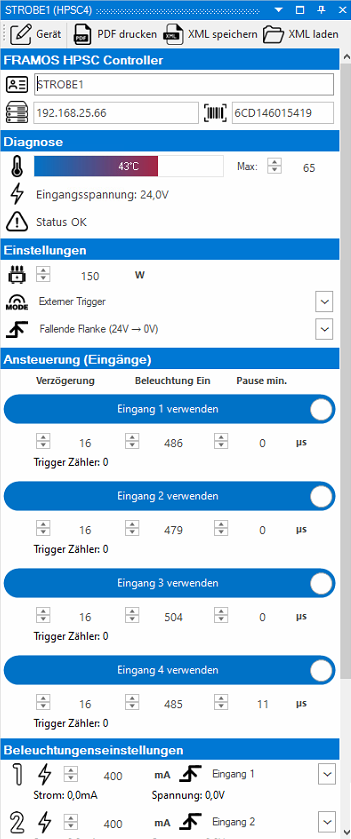
| Menu | Description | |
|---|---|---|

|
Device | The name and network settings can be changed via the device settings. |

|
Print PDF | Generates a PDF with all device settings. |

|
Save XML | Generates an XML file with all device settings. |

|
Load XML | Reads an XML file and loads all settings into the device if manufacturer and model are identical. |
 Device information

|
Name of the device. |

|
Current IP address of the device. |

|
Serial number of the device. |
Diagnosis

|
The current internal temperature of the device is displayed in the bar. The maximum temperature can be set in the input field. |

|
Currently measured input voltage on the device. This information helps with troubleshooting if the connected power supply unit is supplying too little voltage. |

|
Displays the current internal error (generated and reported by the device). |
Settings

|
Specification of the available maximum input power from the power supply unit. This value is used to calculate the available control parameters. |

|
Operating mode of the device. This must be matched to the set operating current of the lighting, otherwise the lighting may be damaged. |

|
Trigger edge for activating the control. |
Control (inputs)
| Mode | Activates/deactivates the input. |
| Delay | Delay from detection of the input signal to activation of the lighting output in microseconds (µs). |
| Illumination ON | Duty cycle of the illumination in microseconds (µs). This must be adjusted to the set operating current of the illumination, otherwise the illumination may be damaged. |
| Pause min. | Minimum pause between two switch-on cycles in microseconds (µs). |
| Trigger counter | Number of trigger events counted. |
| Testing | Manual triggering of the trigger signal. This function is not available in all operating modes. |
Illumination settings
|
|
Preset current for controlling the illumination. This must be matched to the set duty cycle of the lighting and the operating mode, otherwise the Lighting can be damaged. |
|
|
Number of the trigger input that controls the illumination. |
| Current | Measured current in milliamperes (mA). |
| Volatage | Measured voltage in volts (V) |
Voltage generator

|
Maximum voltage specification for generating the currents. |
| Mode | Activate or deactivate automatic calculation of the ideal voltage based on the maximum specifications. |
| Target | Set target voltage in volts (V). |
| Measured | Actual measured voltage in volts (V). |
Change device settings
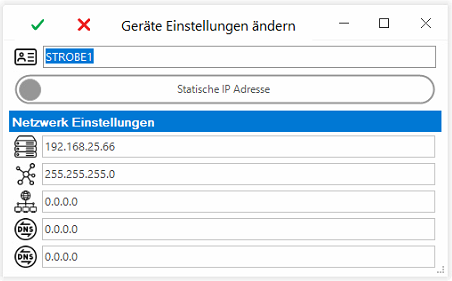
Information: Applying the new device configuration leads to a restart of the device and should therefore not be carried out during operation.
|
|
Name of the device. This is permanently stored in the device and is used for easier identification if there are several devices in the network. |
| Mode | Dynamic or static IP address. |
|
|
IP address if 'Static IP address' mode has been selected. |

|
Subnet mask if 'Static IP address' mode was selected. |

|
IP address of the gateway. |

|
IP address of the preferred DNS server. |
|
|
IP address of the alternative DNS server. |
EasySightPro control unit
The FRAMOS HPSC controllers can be integrated as a EasySightPro® control unit via Administration → Administration → Control devices. However, they do not provide any features for changing the lighting settings via the test program administration.
If the controller is integrated as a control device, the connection is displayed and monitored in the EasySightPro status bar. If the controller loses the connection via Ethernet, this is visible in the status bar.