Installation
Important: Please observe our requirements (IT) to ensure that EasySightPro functions smoothly
Information: Uninstall EasySightPro before each update via the system settings 'Apps and features'. When changing the main version, all Cognex packages must also be uninstalled.
-
Start the installation and select the setup language
-
Before installation, the system checks whether any running programmes are blocking the installation.
-
Select all components to be installed:
Components Default Description .Net dependencies ü Microsoft .Net dependencies for the operation of EasySightPro®. Cognex VisionPro ü Cognex VisionPro image processing library. Is necessary for the operation of EasySightPro®. Cognex Deep-Learning Required for the integration of deep learning applications. cifX Fieldbus ü Contains all drivers for communication via fieldbus (EASYSIGHTPRO-COMM cards). Gardasoft Maintainance Utility Tool for parameterising Gardasoft controllers. EasySightPro ü EasySightPro® programme files. EasySightPro Halcon Runtime Mvtec Halcon extension for EasySightPro®. C# Samples C# examples for the integration of own plugins in EasySightPro® Basler ToF driver Driver for Basler TimeOfFlight cameras. Mitsubishi CIS driver Driver for Mitsubishi CIS cameras. -
Select the installation path. The default is C:\Program Files\RELISTE GesmbH\EasySightPro
-
Start the installation. Confirm any pop-ups during the installation.
-
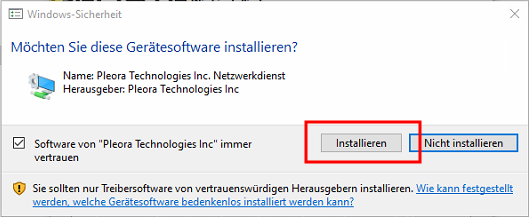
Accept the device drivers using 'Install'
-
-
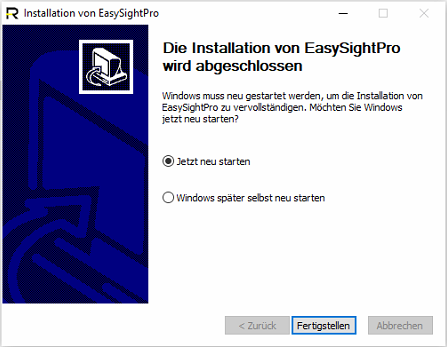
To complete the installation, the controller must be restarted.
-
Windows user rights
The Windows Standard User account is sufficient to run EasySightPro®. No administrator rights are required.
In addition, make sure that the rights to the following folders are set correctly:
-
%PROGRAMDATA%\EasySightPro (write/read permissions)
-
%VPRO_ROOT% (write/read permissions)
-
%ESP_ROOT% (full access)
Information: The placeholders indicated with %% are environment variables. These are set during installation. You can resolve them by copying the complete path into the address bar of Windows Explorer and confirming with ENTER. This will redirect you to the correct folder..