Virtual camera
In ESP können in der Kamera Administration virtuelle Kameras hinzuigefügt werden. Diese simuliert eine Kamera und verwendet als Bildquelle lokall gespeicherte Bilddateien.
In EasySightPro®, virtual cameras can be added in Camera Administration. This simulates a camera and uses locally stored image files as the image source
Typical applications:
-
Creation of inspection programmes with customer images
-
Reading in images from other acquisition systems (third-party cameras)
-
Demonstrations, trade fairs, demos
Important: The virtual camera supports control by external devices via digital inputs and fieldbus.
Image acquisition settings
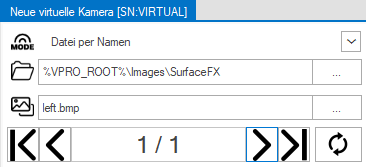
The virtual camera is set up in the acquisition settings  of the inspection programme.
| Menu | Description | |
|---|---|---|

|
Mode |
|

|
Basic folder | Basic folder for image search. |

|
File filter |
Filter for selecting the desired images. You can use * as a wildcard. Example: *.bmp. Image_*.bmp |

|
First image | Loads the first image into the inspection. |

|
Previous image | Loads the previous image into the inspection. |
| Index / Number of images | Displays the current image and the total number of available images. | |

|
Next image | Loads the next image into the inspection. |

|
Last image | Loads the last image into the inspection. |

|
Reload files | Reloads the file list. This is helpful if files have been subsequently added to the base folder. |